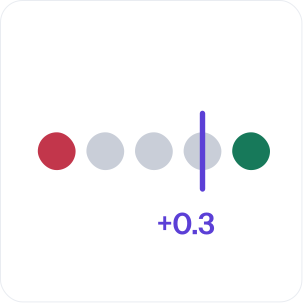
Buyers increasingly ask AI assistants which providers to consider before they visit a website. Whether your brand appears is only half of the picture. The other half is how it is described: which services the answer attributes to you, what it leaves out, and whether the tone is positive, neutral or negative. ShareOfAsk brings that description together with the evidence behind it.
What you see in the Perception view
Perception is one of 5 views in ShareOfAsk, alongside Visibility, Competitors, Sources and Actions. It is built to answer a simple question: what do AI answers actually say about you?

Perception · Summary
Example data
Answers describe Acme Consulting as a CRM consulting partner. They do not explain how customer data is protected during a migration.
Described
- · CRM consulting partner
- · Structured migration process
Not described
- · Data protection during migration
- AI summary. How your brand is described across the reviewed mentions, for example which capability is recognized and which one is not explained.
- Described and not described. A side-by-side view of the parts of your offer that appear in the mentions and the parts that do not, such as a service you provide that the answers never mention.
- Brand mentions with sentiment. Each selected mention shows the tracked question, the AI answer excerpt and its sentiment, so the rating is never separated from the words that produced it.
- Average sentiment per brand. The brands table shows Avg Sentiment for your brand and each competitor, so you can compare tone across the same questions.
Use these findings to bring concrete wording into your positioning and content review instead of relying on an impression of what "AI thinks" about your brand.
How the sentiment score works
Each brand mention in an AI answer gets a label (positive, neutral or negative) and a numeric score from −1.0 (very negative) to +1.0 (very positive), both assigned by LLM analysis. Each brand’s scores are averaged for every snapshot, so you can follow your Avg Sentiment over time.
The 5 levels you see in the app are display thresholds on that score:
| Score | Level |
|---|---|
| +0.5 to +1.0 | Very Positive |
| +0.1 to +0.5 | Positive |
| −0.1 to +0.1 | Neutral |
| −0.5 to −0.1 | Negative |
| −1.0 to −0.5 | Very Negative |
You can also filter and sort brand mentions by sentiment through the ShareOfAsk MCP server.
Perception · Avg Sentiment
Example data
Very Negative
−1.0 to −0.5
Negative
−0.5 to −0.1
Neutral
−0.1 to +0.1
Positive
+0.1 to +0.5
Very Positive
+0.5 to +1.0
Your brand
+0.21 Positive
Competitor A
+0.05 Neutral
Competitor B
−0.18 Negative
Why sentiment needs the original wording
A sentiment score is an interpretation of an answer. Our methodology is explicit that brand detection, sentiment and other extracted labels are interpretations of the recorded answer and can contain errors. That is why ShareOfAsk keeps the recorded answer available to inspect.
A neutral mention shows how an AI answer describes your brand. It is not a recommendation or proof of capability. A brand may also appear in a comparison, a neutral description or a negative comment — so read the original answer and its context before treating a mention as an endorsement.
In practice, this means your team can move from "we have a neutral mention" to "the answer describes us as a consulting partner but does not explain how we protect a migration" — a statement you can act on.
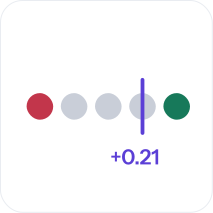
Illustration, not data
Compare descriptions across models
Models can describe the same brand differently. ShareOfAsk records each answer against a particular question, model and point in time, so you can keep the question and model in view as you compare mentions, sources and competitive context.
The product supports surfaces from OpenAI (ChatGPT), Anthropic (Claude), Google Gemini, xAI (Grok), Perplexity, Google AI Overviews and Google AI Mode. Available models and search surfaces depend on your plan and settings: Free Scan uses 3 AI models, Starter lets you choose up to 3 models per workspace and Growth up to 4. The app shows the current choices — see plans and pricing.
Questions matter too. Questions that name your brand can help examine its perception, while discovery questions about your category show whether you are named at all. Keep the two types separate when you interpret the results.
 ChatGPT
 Claude
 Gemini
 Grok
Grok Perplexity
 Google AI Overviews
ChatGPT, Claude, Gemini, Grok, Perplexity and Google are trademarks of their respective owners. ShareOfAsk is not affiliated with or endorsed by them.
From perception to action
Perception findings are most useful when they lead to a decision. In ShareOfAsk, the Actions view turns findings into prioritized actions with supporting evidence, practical steps and completion criteria. Your team decides what to change and carries out the work. You can record actions as completed or dismissed.
A typical loop looks like this:
An action does not guarantee an improvement or establish what caused a change. Repeated snapshots let you review the pattern alongside the work you completed.
- Find a question where the description of your brand is incomplete or unfavorable.
- Open the sources behind the answer to see which pages were cited (see the Sources view).
- Review how clearly your own website explains the same capability.
- Choose a change to test, then revisit the same questions in later snapshots.
Who uses sentiment tracking
Marketing teams use Perception to give content and positioning discussions a concrete starting point — real wording from AI answers instead of assumptions. Agencies bring the descriptions, the evidence and a proposed priority into client reviews. See ShareOfAsk for agencies and our use cases.
To understand why models disagree about the same brand, read when ChatGPT and Claude disagree on your brand.
Illustration, not data
FAQ
Can ShareOfAsk tell me if AI describes my brand negatively?
Yes. Each brand mention gets a label (positive, neutral or negative) and a score from −1 to +1. The app shows it on 5 levels, from Very Negative to Very Positive, next to the original answer excerpt and the tracked question. Each brand also gets an average sentiment. You can find negative descriptions and read them in context. Sentiment is an interpretation of the answer and can contain errors, so check the original wording.
How is the sentiment score calculated?
LLM analysis assigns each brand mention in an AI answer a label (positive, neutral or negative) and a numeric score from −1.0 (very negative) to +1.0 (very positive). Each brand’s scores are averaged for every snapshot, so you can follow your Avg Sentiment over time. The 5 levels in the app (Very Positive, Positive, Neutral, Negative, Very Negative) are display thresholds on the score. You can also filter and sort brand mentions by sentiment through the ShareOfAsk MCP server.
Is a positive or neutral mention a recommendation?
No. A mention is not necessarily a recommendation. A brand may appear in a comparison, a neutral description or a negative comment, so read the original answer before treating a mention as an endorsement.
Which AI models does sentiment tracking cover?
Free Scan uses 3 models from OpenAI, Anthropic and Google. Paid plans let you choose from the available catalog: up to 3 models per workspace on Starter and 4 on Growth. Supported surfaces include OpenAI (ChatGPT), Anthropic (Claude), Google Gemini, xAI (Grok), Perplexity, Google AI Overviews and Google AI Mode, depending on plan and settings.
Will I see the same description in a consumer AI app?
Not necessarily. ShareOfAsk measures responses through configured provider integrations. A consumer session can use different model versions, search settings, location, personalization or conversation history.
Can I try it for free?
Yes. Free Scan checks 10 questions across 3 AI models and includes one action analysis. You can review and share the results for 7 days.